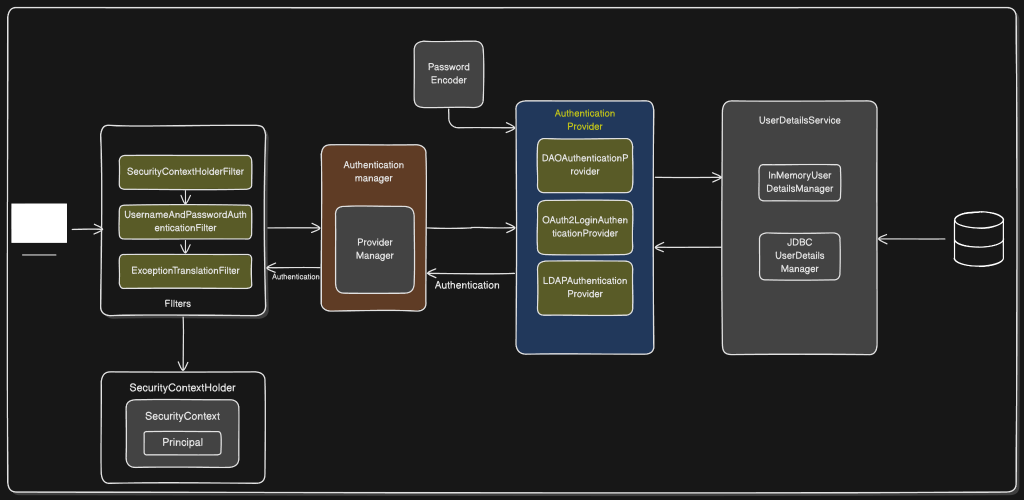
Spring Security Architecture Overview
This document explains all components shown in your Spring Security architecture diagram, focusing on the flow of authentication and the role of each module.
1. Filters Layer
Spring Security uses a chain of servlet filters. Each filter performs a specific security-related function.
SecurityContextHolderFilter
- The entry point for security context management.
- Retrieves the current SecurityContext (if present) and places it in SecurityContextHolder.
- Ensures security context is available for the request lifecycle.
UsernameAndPasswordAuthenticationFilter
- Intercepts login requests (typically /login).
- Extracts username and password.
- Creates a UsernamePasswordAuthenticationToken and sends it to the AuthenticationManager.
ExceptionTranslationFilter
- Catches security-related exceptions thrown during filter processing.
- Handles AuthenticationException and AccessDeniedException.
- Redirects to login page or returns 403 depending on context.
2. SecurityContextHolder
The central storage for all security information during a request.
SecurityContext
- Holds the currently authenticated user’s details.
- Contains the Authentication object.
Principal
- The user identity object extracted from the Authentication object.
- Usually an instance of UserDetails.
3. Authentication Manager
Responsible for orchestrating authentication.
ProviderManager
- The default implementation of AuthenticationManager.
- Iterates over a list of AuthenticationProvider instances.
- Delegates authentication until one provider successfully authenticates.
4. Authentication Providers
Each provider knows how to validate a specific type of authentication.
DAOAuthenticationProvider
- Uses UserDetailsService and PasswordEncoder.
- Loads user details by username.
- Validates password.
OAuth2LoginAuthenticationProvider
- Handles OAuth2 login flows (Google, GitHub, etc.).
- Validates tokens and retrieves user info from the OAuth2 provider.
LDAPAuthenticationProvider
- Integrates with LDAP directories.
- Validates credentials and loads user authorities.
5. Password Encoder
- Responsible for hashing and verifying passwords.
- Common implementations include BCryptPasswordEncoder.
- Always applied by providers like DAOAuthenticationProvider.
6. UserDetailsService Layer
Resolves user information during authentication.
InMemoryUserDetailsManager
- Stores user details in memory.
- Useful for testing and simple setups.
JDBCUserDetailsManager
- Fetches users from a relational database.
- Uses predefined or custom SQL queries.
7. Database
- Stores user credentials and authorities when using JDBCUserDetailsManager.
- Authentication provider fetches user data from here.
Authentication Flow Summary
Here are the code snippets corresponding to each step of the Spring Security username/password authentication flow.
Since Spring Security handles much of this internally, I have provided a mix of Configuration code (how you set it up) and Internal/Customization code (what Spring is actually doing under the hood, or how you would write it if you built it manually).
These snippets target modern Spring Security (Spring Boot 3 / Spring Security 6).
1. Request enters the filter chain
The SecurityFilterChain defines the rules for your application and orders the filters. When a request hits a protected endpoint, it passes through this chain.
Java
@Configuration
@EnableWebSecurity
public class SecurityConfig {

    @Bean
    public SecurityFilterChain securityFilterChain(HttpSecurity http) throws Exception {
        http
            .authorizeHttpRequests(auth -> auth
                .requestMatchers("/public", "/login").permitAll()
                .anyRequest().authenticated() // Enters the filter chain here
            )
            .formLogin(form -> form
                .loginProcessingUrl("/login") // This URL triggers the authentication filter
            );

        return http.build();
    }
}
2. UsernamePasswordAuthenticationFilter extracts credentials
When a POST request hits the /login URL, this specific filter activates. It pulls the username and password from the request and creates an unauthenticated token.
Java
// Simplified view of what Spring Security does internally in attemptAuthentication():

String username = request.getParameter("username");
String password = request.getParameter("password");

// Create an unauthenticated token with the extracted credentials
UsernamePasswordAuthenticationToken authRequest =
    UsernamePasswordAuthenticationToken.unauthenticated(username, password);
3. Filter delegates to AuthenticationManager
The filter doesn’t check the database itself. It passes the unauthenticated token to the AuthenticationManager to do the heavy lifting.
Java
// Inside UsernamePasswordAuthenticationFilter:

// Delegate to the manager and wait for a fully authenticated token back
Authentication authenticationResult =
    this.getAuthenticationManager().authenticate(authRequest);
4. AuthenticationManager calls each AuthenticationProvider
The default AuthenticationManager (called ProviderManager) loops through its list of providers until it finds one that supports the specific token type.
Java
// How you register a provider with the manager in your config:
@Bean
public AuthenticationManager authenticationManager(
        UserDetailsService userDetailsService,
        PasswordEncoder passwordEncoder) {

    DaoAuthenticationProvider provider = new DaoAuthenticationProvider();
    provider.setUserDetailsService(userDetailsService);
    provider.setPasswordEncoder(passwordEncoder);

    return new ProviderManager(provider);
}
5. A matching provider loads the user using UserDetailsService
The DaoAuthenticationProvider reaches out to your database (or other storage) via the UserDetailsService to fetch the user’s record.
Java
@Service
public class CustomUserDetailsService implements UserDetailsService {

    private final UserRepository userRepository;

    public CustomUserDetailsService(UserRepository userRepository) {
        this.userRepository = userRepository;
    }

    @Override
    public UserDetails loadUserByUsername(String username) throws UsernameNotFoundException {
        // Fetch user from DB
        UserEntity user = userRepository.findByUsername(username)
            .orElseThrow(() -> new UsernameNotFoundException("User not found"));

        // Return a Spring Security UserDetails object
        return new org.springframework.security.core.userdetails.User(
            user.getUsername(),
            user.getPassword(), // The hashed password from the DB
            user.getAuthorities()
        );
    }
}
6. Password is verified via PasswordEncoder
Once the provider has the user record from the database, it uses the PasswordEncoder to compare the raw password from the request with the hashed password from the database.
Java
// 1. Defining the encoder in your config:
@Bean
public PasswordEncoder passwordEncoder() {
    return new BCryptPasswordEncoder();
}

// 2. What DaoAuthenticationProvider does internally:
boolean isMatch = passwordEncoder.matches(
    authRequest.getCredentials().toString(), // Raw password from user
    userDetails.getPassword()                // Hashed password from DB
);

if (!isMatch) {
    throw new BadCredentialsException("Invalid password");
}
7. Successful Authentication is stored in SecurityContextHolder
If the credentials match, the provider returns an authenticated token. The framework (or your custom code) saves this token into the SecurityContextHolder so the application knows who the user is.
Java
// What Spring does internally on success:

// 1. Create an empty context
SecurityContext context = SecurityContextHolder.createEmptyContext();

// 2. Set the fully authenticated token (which now includes roles/authorities)
context.setAuthentication(authenticationResult);

// 3. Store the context
SecurityContextHolder.setContext(context);
8. Subsequent requests use the stored context until cleared
Spring Security persists the context across requests (usually via the HttpSession). You can now easily extract the authenticated user anywhere in your application.
Java
@RestController
public class ProfileController {

    // Method 1: Using Spring MVC argument resolution
    @GetMapping("/profile")
    public String getProfile(@AuthenticationPrincipal UserDetails currentUser) {
        return "Welcome back, " + currentUser.getUsername();
    }

    // Method 2: Manually grabbing it from the context anywhere in your code
    @GetMapping("/manual-profile")
    public String getProfileManually() {
        Authentication auth = SecurityContextHolder.getContext().getAuthentication();
        return "Welcome back, " + auth.getName();
    }
}